Curated repos, tools, and frameworks shaping the developer ecosystem. Live data from GitHub.
by gsd-build
A light-weight and powerful meta-prompting, context engineering and spec-driven development system for Claude Code by TÂCHES.
A light-weight and powerful meta-prompting, context engineering and spec-driven development system for Claude Code, OpenCode, Gemini CLI, Codex, Copilot, and Antigravity.
Solves context rot — the quality degradation that happens as Claude fills its context window.
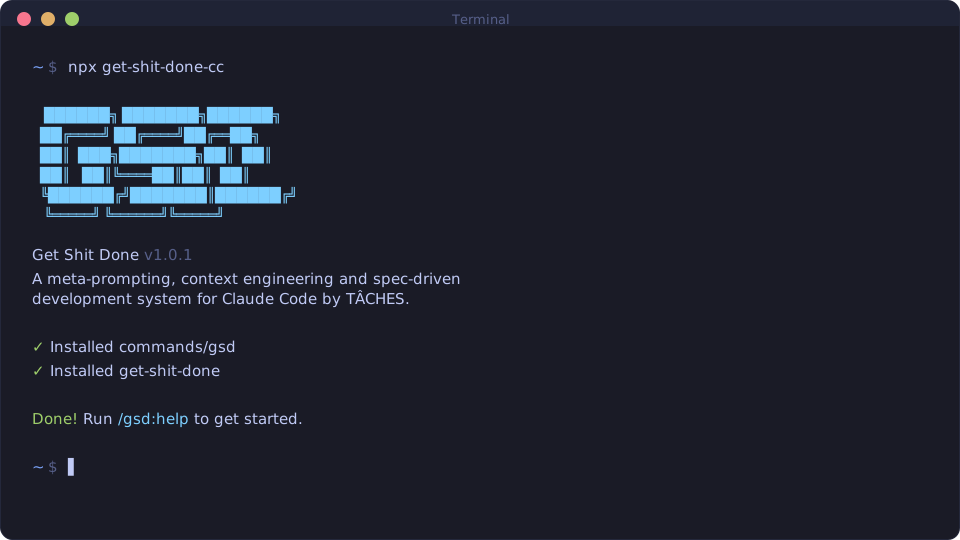
npx get-shit-done-cc@latest
Works on Mac, Windows, and Linux.
"If you know clearly what you want, this WILL build it for you. No bs."
"I've done SpecKit, OpenSpec and Taskmaster — this has produced the best results for me."
"By far the most powerful addition to my Claude Code. Nothing over-engineered. Literally just gets shit done."
Trusted by engineers at Amazon, Google, Shopify, and Webflow.
Why I Built This · How It Works · Commands · Why It Works · User Guide
I'm a solo developer. I don't write code — Claude Code does.
Other spec-driven development tools exist; BMAD, Speckit... But they all seem to make things way more complicated than they need to be (sprint ceremonies, story points, stakeholder syncs, retrospectives, Jira workflows) or lack real big picture understanding of what you're building. I'm not a 50-person software company. I don't want to play enterprise theater. I'm just a creative person trying to build great things that work.
So I built GSD. The complexity is in the system, not in your workflow. Behind the scenes: context engineering, XML prompt formatting, subagent orchestration, state management. What you see: a few commands that just work.
The system gives Claude everything it needs to do the work and verify it. I trust the workflow. It just does a good job.
That's what this is. No enterprise roleplay bullshit. Just an incredibly effective system for building cool stuff consistently using Claude Code.
— TÂCHES
Vibecoding has a bad reputation. You describe what you want, AI generates code, and you get inconsistent garbage that falls apart at scale.
GSD fixes that. It's the context engineering layer that makes Claude Code reliable. Describe your idea, let the system extract everything it needs to know, and let Claude Code get to work.
People who want to describe what they want and have it built correctly — without pretending they're running a 50-person engineering org.
npx get-shit-done-cc@latest
The installer prompts you to choose:
Verify with:
/gsd:help/gsd-help$gsd-help/gsd:help/gsd:help[!NOTE] Codex installation uses skills (
skills/gsd-*/SKILL.md) rather than custom prompts.
GSD evolves fast. Update periodically:
npx get-shit-done-cc@latest
# Claude Code
npx get-shit-done-cc --claude --global   # Install to ~/.claude/
npx get-shit-done-cc --claude --local    # Install to ./.claude/

# OpenCode (open source, free models)
npx get-shit-done-cc --opencode --global # Install to ~/.config/opencode/

# Gemini CLI
npx get-shit-done-cc --gemini --global   # Install to ~/.gemini/

# Codex (skills-first)
npx get-shit-done-cc --codex --global    # Install to ~/.codex/
npx get-shit-done-cc --codex --local     # Install to ./.codex/

# Copilot (GitHub Copilot CLI)
npx get-shit-done-cc --copilot --global  # Install to ~/.github/
npx get-shit-done-cc --copilot --local   # Install to ./.github/

# Cursor CLI
npx get-shit-done-cc --cursor --global      # Install to ~/.cursor/
npx get-shit-done-cc --cursor --local       # Install to ./.cursor/

# Antigravity (Google, skills-first, Gemini-based)
npx get-shit-done-cc --antigravity --global # Install to ~/.gemini/antigravity/
npx get-shit-done-cc --antigravity --local  # Install to ./.agent/

# All runtimes
npx get-shit-done-cc --all --global      # Install to all directories
Use --global (-g) or --local (-l) to skip the location prompt.
Use --claude, --opencode, --gemini, --codex, --copilot, --cursor, --antigravity, or --all to skip the runtime prompt.
Clone the repository and run the installer locally:
git clone https://github.com/glittercowboy/get-shit-done.git
cd get-shit-done
node bin/install.js --claude --local
Installs to ./.claude/ for testing modifications before contributing.
GSD is designed for frictionless automation. Run Claude Code with:
claude --dangerously-skip-permissions
[!TIP] This is how GSD is intended to be used — stopping to approve
dateandgit commit50 times defeats the purpose.
If you prefer not to use that flag, add this to your project's .claude/settings.json:
{
  "permissions": {
    "allow": [
      "Bash(date:*)",
      "Bash(echo:*)",
      "Bash(cat:*)",
      "Bash(ls:*)",
      "Bash(mkdir:*)",
      "Bash(wc:*)",
      "Bash(head:*)",
      "Bash(tail:*)",
      "Bash(sort:*)",
      "Bash(grep:*)",
      "Bash(tr:*)",
      "Bash(git add:*)",
      "Bash(git commit:*)",
      "Bash(git status:*)",
      "Bash(git log:*)",
      "Bash(git diff:*)",
      "Bash(git tag:*)"
    ]
  }
}
Already have code? Run
/gsd:map-codebasefirst. It spawns parallel agents to analyze your stack, architecture, conventions, and concerns. Then/gsd:new-projectknows your codebase — questions focus on what you're adding, and planning automatically loads your patterns.
/gsd:new-project
One command, one flow. The system:
You approve the roadmap. Now you're ready to build.
Creates: PROJECT.md, REQUIREMENTS.md, ROADMAP.md, STATE.md, .planning/research/
/gsd:discuss-phase 1
This is where you shape the implementation.
Your roadmap has a sentence or two per phase. That's not enough context to build something the way you imagine it. This step captures your preferences before anything gets researched or planned.
The system analyzes the phase and identifies gray areas based on what's being built:
For each area you select, it asks until you're satisfied. The output — CONTEXT.md — feeds directly into the next two steps:
The deeper you go here, the more the system builds what you actually want. Skip it and you get reasonable defaults. Use it and you get your vision.
Creates: {phase_num}-CONTEXT.md
Assumptions Mode: Prefer codebase analysis over questions? Set
workflow.discuss_modetoassumptionsin/gsd:settings. The system reads your code, surfaces what it would do and why, and only asks you to correct what's wrong. See Discuss Mode.
/gsd:plan-phase 1
The system:
Each plan is small enough to execute in a fresh context window. No degradation, no "I'll be more concise now."
Creates: {phase_num}-RESEARCH.md, {phase_num}-{N}-PLAN.md
/gsd:execute-phase 1
The system:
Walk away, come back to completed work with clean git history.
How Wave Execution Works:
Plans are grouped into "waves" based on dependencies. Within each wave, plans run in parallel. Waves run sequentially.
┌────────────────────────────────────────────────────────────────────┐
│  PHASE EXECUTION                                                   │
├────────────────────────────────────────────────────────────────────┤
│                                                                    │
│  WAVE 1 (parallel)          WAVE 2 (parallel)          WAVE 3      │
│  ┌─────────┐ ┌─────────┐    ┌─────────┐ ┌─────────┐    ┌─────────┐ │
│  │ Plan 01 │ │ Plan 02 │ →  │ Plan 03 │ │ Plan 04 │ →  │ Plan 05 │ │
│  │         │ │         │    │         │ │         │    │         │ │
│  │ User    │ │ Product │    │ Orders  │ │ Cart    │    │ Checkout│ │
│  │ Model   │ │ Model   │    │ API     │ │ API     │    │ UI      │ │
│  └─────────┘ └─────────┘    └─────────┘ └─────────┘    └─────────┘ │
│       │           │              ↑           ↑              ↑      │
│       └───────────┴──────────────┴───────────┘              │      │
│              Dependencies: Plan 03 needs Plan 01            │      │
│                          Plan 04 needs Plan 02              │      │
│                          Plan 05 needs Plans 03 + 04        │      │
│                                                                    │
└────────────────────────────────────────────────────────────────────┘
Why waves matter:
This is why "vertical slices" (Plan 01: User feature end-to-end) parallelize better than "horizontal layers" (Plan 01: All models, Plan 02: All APIs).
Creates: {phase_num}-{N}-SUMMARY.md, {phase_num}-VERIFICATION.md
/gsd:verify-work 1
This is where you confirm it actually works.
Automated verification checks that code exists and tests pass. But does the feature work the way you expected? This is your chance to use it.
The system:
If everything passes, you move on. If something's broken, you don't manually debug — you just run /gsd:execute-phase again with the fix plans it created.
Creates: {phase_num}-UAT.md, fix plans if issues found
/gsd:discuss-phase 2
/gsd:plan-phase 2
/gsd:execute-phase 2
/gsd:verify-work 2
/gsd:ship 2                  # Create PR from verified work
...
/gsd:complete-milestone
/gsd:new-milestone
Or let GSD figure out the next step automatically:
/gsd:next # Auto-detect and run next step
Loop discuss → plan → execute → verify → ship until milestone complete.
If you want faster intake during discussion, use /gsd:discuss-phase <n> --batch to answer a small grouped set of questions at once instead of one-by-one.
Each phase gets your input (discuss), proper research (plan), clean execution (execute), and human verification (verify). Context stays fresh. Quality stays high.
When all phases are done, /gsd:complete-milestone archives the milestone and tags the release.
Then /gsd:new-milestone starts the next version — same flow as new-project but for your existing codebase. You describe what you want to build next, the system researches the domain, you scope requirements, and it creates a fresh roadmap. Each milestone is a clean cycle: define → build → ship.
/gsd:quick
For ad-hoc tasks that don't need full planning.
Quick mode gives you GSD guarantees (atomic commits, state tracking) with a faster path:
.planning/quick/, not phases--discuss flag: Lightweight discussion to surface gray areas before planning.
--research flag: Spawns a focused researcher before planning. Investigates implementation approaches, library options, and pitfalls. Use when you're unsure how to approach a task.
--full flag: Enables plan-checking (max 2 iterations) and post-execution verification.
Flags are composable: --discuss --research --full gives discussion + research + plan-checking + verification.
/gsd:quick
> What do you want to do? "Add dark mode toggle to settings"
Creates: .planning/quick/001-add-dark-mode-toggle/PLAN.md, SUMMARY.md
Claude Code is incredibly powerful if you give it the context it needs. Most people don't.
GSD handles it for you:
| File | What it does |
|---|---|
PROJECT.md | Project vision, always loaded |
research/ | Ecosystem knowledge (stack, features, architecture, pitfalls) |
REQUIREMENTS.md | Scoped v1/v2 requirements with phase traceability |
ROADMAP.md | Where you're going, what's done |
STATE.md | Decisions, blockers, position — memory across sessions |
PLAN.md | Atomic task with XML structure, verification steps |
SUMMARY.md | What happened, what changed, committed to history |
todos/ | Captured ideas and tasks for later work |
threads/ | Persistent context threads for cross-session work |
seeds/ | Forward-looking ideas that surface at the right milestone |
Size limits based on where Claude's quality degrades. Stay under, get consistent excellence.
Every plan is structured XML optimized for Claude:
<task type="auto">
  <name>Create login endpoint</name>
  <files>src/app/api/auth/login/route.ts</files>
  <action>
    Use jose for JWT (not jsonwebtoken - CommonJS issues).
    Validate credentials against users table.
    Return httpOnly cookie on success.
  </action>
  <verify>curl -X POST localhost:3000/api/auth/login returns 200 + Set-Cookie</verify>
  <done>Valid credentials return cookie, invalid return 401</done>
</task>
Precise instructions. No guessing. Verification built in.
Every stage uses the same pattern: a thin orchestrator spawns specialized agents, collects results, and routes to the next step.
| Stage | Orchestrator does | Agents do |
|---|---|---|
| Research | Coordinates, presents findings | 4 parallel researchers investigate stack, features, architecture, pitfalls |
| Planning | Validates, manages iteration | Planner creates plans, checker verifies, loop until pass |
| Execution | Groups into waves, tracks progress | Executors implement in parallel, each with fresh 200k context |
| Verification | Presents results, routes next | Verifier checks codebase against goals, debuggers diagnose failures |
The orchestrator never does heavy lifting. It spawns agents, waits, integrates results.
The result: You can run an entire phase — deep research, multiple plans created and verified, thousands of lines of code written across parallel executors, automated verification against goals — and your main context window stays at 30-40%. The work happens in fresh subagent contexts. Your session stays fast and responsive.
Each task gets its own commit immediately after completion:
abc123f docs(08-02): complete user registration plan
def456g feat(08-02): add email confirmation flow
hij789k feat(08-02): implement password hashing
lmn012o feat(08-02): create registration endpoint
[!NOTE] Benefits: Git bisect finds exact failing task. Each task independently revertable. Clear history for Claude in future sessions. Better observability in AI-automated workflow.
Every commit is surgical, traceable, and meaningful.
You're never locked in. The system adapts.
| Command | What it does |
|---|---|
/gsd:new-project [--auto] | Full initialization: questions → research → requirements → roadmap |
/gsd:discuss-phase [N] [--auto] [--analyze] | Capture implementation decisions before planning (--analyze adds trade-off analysis) |
/gsd:plan-phase [N] [--auto] [--reviews] | Research + plan + verify for a phase (--reviews loads codebase review findings) |
/gsd:execute-phase <N> | Execute all plans in parallel waves, verify when complete |
/gsd:verify-work [N] | Manual user acceptance testing ¹ |
/gsd:ship [N] [--draft] | Create PR from verified phase work with auto-generated body |
/gsd:next | Automatically advance to the next logical workflow step |
/gsd:fast <text> | Inline trivial tasks — skips planning entirely, executes immediately |
/gsd:audit-milestone | Verify milestone achieved its definition of done |
/gsd:complete-milestone | Archive milestone, tag release |
/gsd:new-milestone [name] | Start next version: questions → research → requirements → roadmap |
/gsd:forensics [desc] | Post-mortem investigation of failed workflow runs (diagnoses stuck loops, missing artifacts, git anomalies) |
/gsd:milestone-summary [version] | Generate comprehensive project summary for team onboarding and review |
| Command | What it does |
|---|---|
/gsd:workstreams list | Show all workstreams and their status |
/gsd:workstreams create <name> | Create a namespaced workstream for parallel milestone work |
/gsd:workstreams switch <name> | Switch active workstream |
/gsd:workstreams complete <name> | Complete and merge a workstream |
| Command | What it does |
|---|---|
/gsd:new-workspace | Create isolated workspace with repo copies (worktrees or clones) |
/gsd:list-workspaces | Show all GSD workspaces and their status |
/gsd:remove-workspace | Remove workspace and clean up worktrees |
| Command | What it does |
|---|---|
/gsd:ui-phase [N] | Generate UI design contract (UI-SPEC.md) for frontend phases |
/gsd:ui-review [N] | Retroactive 6-pillar visual audit of implemented frontend code |
| Command | What it does |
|---|---|
/gsd:progress | Where am I? What's next? |
/gsd:next | Auto-detect state and run the next step |
/gsd:help | Show all commands and usage guide |
/gsd:update | Update GSD with changelog preview |
/gsd:join-discord | Join the GSD Discord community |
/gsd:manager | Interactive command center for managing multiple phases |
| Command | What it does |
|---|---|
/gsd:map-codebase [area] | Analyze existing codebase before new-project |
| Command | What it does |
|---|---|
/gsd:add-phase | Append phase to roadmap |
/gsd:insert-phase [N] | Insert urgent work between phases |
/gsd:remove-phase [N] | Remove future phase, renumber |
/gsd:list-phase-assumptions [N] | See Claude's intended approach before planning |
/gsd:plan-milestone-gaps | Create phases to close gaps from audit |
| Command | What it does |
|---|---|
/gsd:pause-work | Create handoff when stopping mid-phase (writes HANDOFF.json) |
/gsd:resume-work | Restore from last session |
/gsd:session-report | Generate session summary with work performed and outcomes |
| Command | What it does |
|---|---|
/gsd:workstreams | Manage parallel workstreams (list, create, switch, status, progress, complete) |
| Command | What it does |
|---|---|
/gsd:review | Cross-AI peer review of current phase or branch |
/gsd:pr-branch | Create clean PR branch filtering .planning/ commits |
/gsd:audit-uat | Audit verification debt — find phases missing UAT |
| Command | What it does |
|---|---|
/gsd:plant-seed <idea> | Capture forward-looking ideas with trigger conditions — surfaces at the right milestone |
/gsd:add-backlog <desc> | Add idea to backlog parking lot (999.x numbering, outside active sequence) |
/gsd:review-backlog | Review and promote backlog items to active milestone or remove stale entries |
/gsd:thread [name] | Persistent context threads — lightweight cross-session knowledge for work spanning multiple sessions |
| Command | What it does |
|---|---|
/gsd:settings | Configure model profile and workflow agents |
/gsd:set-profile <profile> | Switch model profile (quality/balanced/budget/inherit) |
/gsd:add-todo [desc] | Capture idea for later |
/gsd:check-todos | List pending todos |
/gsd:debug [desc] | Systematic debugging with persistent state |
/gsd:do <text> | Route freeform text to the right GSD command automatically |
/gsd:note <text> | Zero-friction idea capture — append, list, or promote notes to todos |
/gsd:quick [--full] [--discuss] [--research] | Execute ad-hoc task with GSD guarantees (--full adds plan-checking and verification, --discuss gathers context first, --research investigates approaches before planning) |
/gsd:health [--repair] | Validate .planning/ directory integrity, auto-repair with --repair |
/gsd:stats | Display project statistics — phases, plans, requirements, git metrics |
/gsd:profile-user [--questionnaire] [--refresh] | Generate developer behavioral profile from session analysis for personalized responses |
¹ Contributed by reddit user OracleGreyBeard
GSD stores project settings in .planning/config.json. Configure during /gsd:new-project or update later with /gsd:settings. For the full config schema, workflow toggles, git branching options, and per-agent model breakdown, see the User Guide.
| Setting | Options | Default | What it controls |
|---|---|---|---|
mode | yolo, interactive | interactive | Auto-approve vs confirm at each step |
granularity | coarse, standard, fine | standard | Phase granularity — how finely scope is sliced (phases × plans) |
Control which Claude model each agent uses. Balance quality vs token spend.
| Profile | Planning | Execution | Verification |
|---|---|---|---|
quality | Opus | Opus | Sonnet |
balanced (default) | Opus | Sonnet | Sonnet |
budget | Sonnet | Sonnet | Haiku |
inherit | Inherit | Inherit | Inherit |
Switch profiles:
/gsd:set-profile budget
Use inherit when using non-Anthropic providers (OpenRouter, local models) or to follow the current runtime model selection (e.g. OpenCode /model).
Or configure via /gsd:settings.
These spawn additional agents during planning/execution. They improve quality but add tokens and time.
| Setting | Default | What it does |
|---|---|---|
workflow.research | true | Researches domain before planning each phase |
workflow.plan_check | true | Verifies plans achieve phase goals before execution |
workflow.verifier | true | Confirms must-haves were delivered after execution |
workflow.auto_advance | false | Auto-chain discuss → plan → execute without stopping |
workflow.research_before_questions | false | Run research before discussion questions instead of after |
workflow.discuss_mode | 'discuss' | Discussion mode: discuss (interview), assumptions (codebase-first) |
workflow.skip_discuss | false | Skip discuss-phase in autonomous mode |
workflow.text_mode | false | Text-only mode for remote sessions (no TUI menus) |
Use /gsd:settings to toggle these, or override per-invocation:
/gsd:plan-phase --skip-research/gsd:plan-phase --skip-verify| Setting | Default | What it controls |
|---|---|---|
parallelization.enabled | true | Run independent plans simultaneously |
planning.commit_docs | true | Track .planning/ in git |
hooks.context_warnings | true | Show context window usage warnings |
Control how GSD handles branches during execution.
| Setting | Options | Default | What it does |
|---|---|---|---|
git.branching_strategy | none, phase, milestone | none | Branch creation strategy |
git.phase_branch_template | string | gsd/phase-{phase}-{slug} | Template for phase branches |
git.milestone_branch_template | string | gsd/{milestone}-{slug} | Template for milestone branches |
Strategies:
none — Commits to current branch (default GSD behavior)phase — Creates a branch per phase, merges at phase completionmilestone — Creates one branch for entire milestone, merges at completionAt milestone completion, GSD offers squash merge (recommended) or merge with history.
GSD includes defense-in-depth security since v1.27:
--text-file, --prd) are validated to resolve within the project directorysecurity.cjs module scans for injection patterns in user-supplied text before it enters planning artifactsgsd-prompt-guard scans writes to .planning/ for embedded injection vectors (advisory, not blocking)--fields arguments are caught before they corrupt stateprompt-injection-scan.test.cjs scans all agent/workflow/command files for embedded injection vectors[!NOTE] Because GSD generates markdown files that become LLM system prompts, any user-controlled text flowing into planning artifacts is a potential indirect prompt injection vector. These protections are designed to catch such vectors at multiple layers.
GSD's codebase mapping and analysis commands read files to understand your project. Protect files containing secrets by adding them to Claude Code's deny list:
.claude/settings.json or global){
"permissions": {
"deny": [
"Read(.env)",
"Read(.env.*)",
"Read(**/secrets/*)",
"Read(**/*credential*)",
"Read(**/*.pem)",
"Read(**/*.key)"
]
}
}
This prevents Claude from reading these files entirely, regardless of what commands you run.
[!IMPORTANT] GSD includes built-in protections against committing secrets, but defense-in-depth is best practice. Deny read access to sensitive files as a first line of defense.
Commands not found after install?
~/.claude/commands/gsd/ (global) or ./.claude/commands/gsd/ (local)~/.codex/skills/gsd-*/SKILL.md (global) or ./.codex/skills/gsd-*/SKILL.md (local)Commands not working as expected?
/gsd:help to verify installationnpx get-shit-done-cc to reinstallUpdating to the latest version?
npx get-shit-done-cc@latest
Using Docker or containerized environments?
If file reads fail with tilde paths (~/.claude/...), set CLAUDE_CONFIG_DIR before installing:
CLAUDE_CONFIG_DIR=/home/youruser/.claude npx get-shit-done-cc --global
This ensures absolute paths are used instead of ~ which may not expand correctly in containers.
To remove GSD completely:
# Global installs
npx get-shit-done-cc --claude --global --uninstall
npx get-shit-done-cc --opencode --global --uninstall
npx get-shit-done-cc --gemini --global --uninstall
npx get-shit-done-cc --codex --global --uninstall
npx get-shit-done-cc --copilot --global --uninstall
npx get-shit-done-cc --cursor --global --uninstall
npx get-shit-done-cc --antigravity --global --uninstall

# Local installs (current project)
npx get-shit-done-cc --claude --local --uninstall
npx get-shit-done-cc --opencode --local --uninstall
npx get-shit-done-cc --codex --local --uninstall
npx get-shit-done-cc --copilot --local --uninstall
npx get-shit-done-cc --cursor --local --uninstall
npx get-shit-done-cc --antigravity --local --uninstall
This removes all GSD commands, agents, hooks, and settings while preserving your other configurations.
OpenCode, Gemini CLI, and Codex are now natively supported via npx get-shit-done-cc.
These community ports pioneered multi-runtime support:
| Project | Platform | Description |
|---|---|---|
| gsd-opencode | OpenCode | Original OpenCode adaptation |
| gsd-gemini (archived) | Gemini CLI | Original Gemini adaptation by uberfuzzy |
MIT License. See LICENSE for details.
Claude Code is powerful. GSD makes it reliable.
Get up and running with Kimi-K2.5, GLM-5, MiniMax, DeepSeek, gpt-oss, Qwen, Gemma and other models.